Find it by sight.
Browse previews instead of filenames. Search your library, group models into collections and keep favourites ready for your next print.
MeshVault 2.3 · Now free
Turn folders of models and creator packs into a visual, searchable library. Keep files, previews and creator details together on your own computer.
Donations and affiliate links help keep MeshVault free. Turning affiliate links off will still use store links.
Other platforms and downloads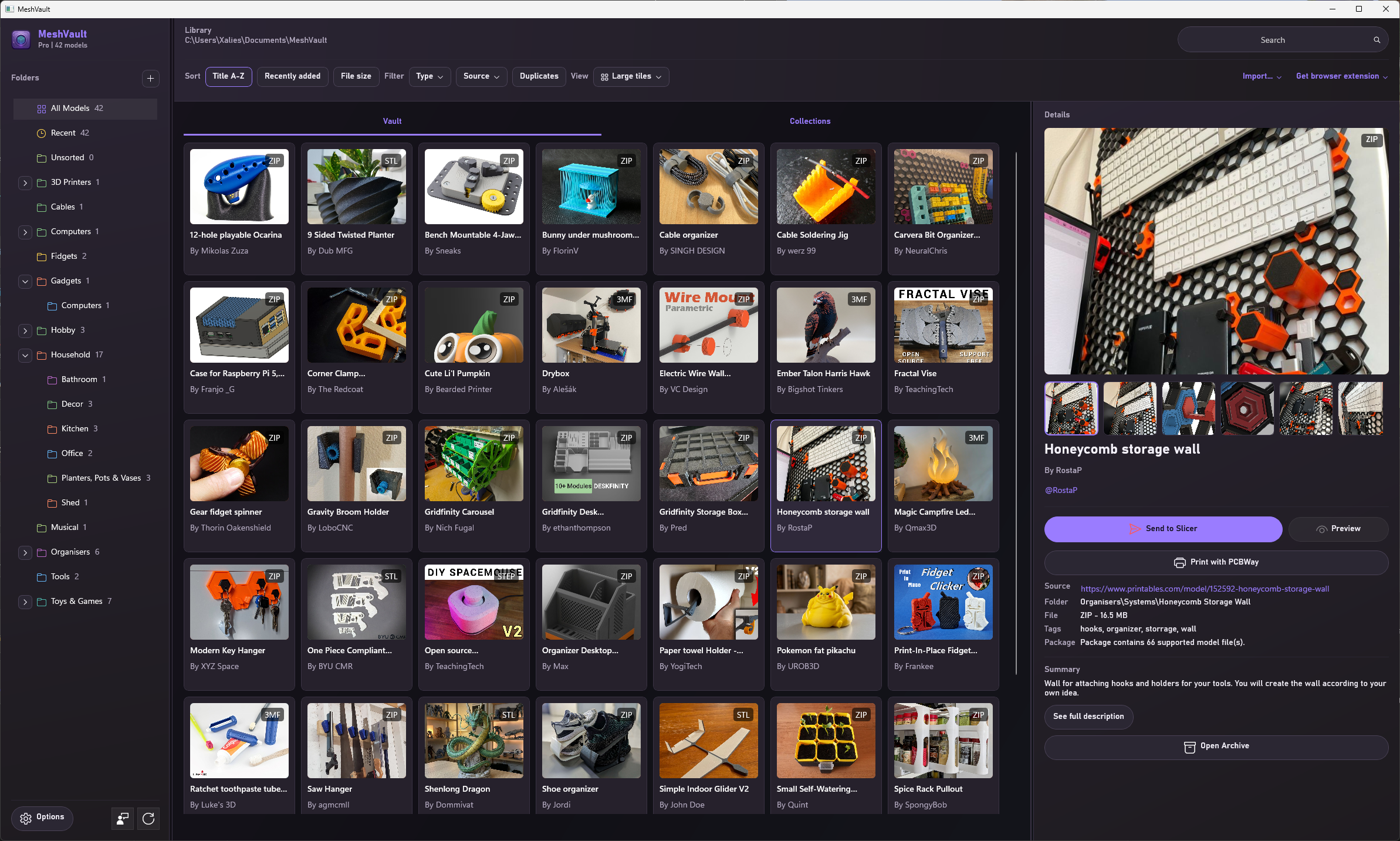
See it in action
Use MeshVault Connect to bring a download into your library with its images, creator and source link already attached.
Works with Printables, MakerWorld, Thingiverse and more model sites.
Less searching. More making.
Browse previews instead of filenames. Search your library, group models into collections and keep favourites ready for your next print.
Import folders and creator packs, or index existing folders in place. Generate thumbnails for supported models that are missing an image.
Your library stays on your computer. Its database travels with the library folder, so your organisation can move with your collection.
STL, 3MF, OBJ, STEP, G-code and more. Check file and preview support →
What’s new in MeshVault 2.3
The full desktop and server apps are now free.
Windows details show coloured swatches from supported 3MF profiles and matched creator guides. Creator matches take priority, with links to the recommended filament.
Import or export one or more models in a single .mvpack, keeping metadata, images, print settings and attachments together, including author support links and generator details.
Improved compatibility with OrcaSlicer, Snapmaker Orca and PrusaSlicer. Use a cached temporary conversion, keep an original version, or replace the original.
Optional affiliate links help keep MeshVault free. Turn them off in Options to use standard links.
Downloads and platforms
Start with the app for your device. Add the browser extension or a shared server when you need them.
MeshVault 2.3 is free on Windows, macOS, Linux and dedicated servers. MeshVault Mobile is also free to download.
Choose the app for the computer where your working library lives.
MeshVault Mobile is free on Android and iOS. The iOS release is currently in beta.
Install the extension for your browser, or open the guide for Safari and setup help.
Run MeshVault on an always-on Windows, Linux, or Docker host for access across your local network.
Frequently asked questions
Your library lives in a folder you choose, with its database stored alongside it. You can browse and organise local models without a cloud account, and move the library folder between supported desktop clients.
Yes. MeshVault 2.3 desktop and server builds are free, with no trial, licence key or subscription. Optional filament affiliate links help fund development. Disable them in Options to keep using standard retailer links.
The library is portable because its database stays inside the library folder, so it can move between supported desktop clients on a portable drive. For simultaneous access from multiple computers, use MeshVault Server. File-sync tools may be suitable when only one client uses the library at a time, but concurrent syncing of the SQLite database can cause conflicts.
No. Start with the desktop app to organise files on your computer. MeshVault Connect adds downloads and source details from supported model sites. MeshVault Server is optional and lets multiple devices access a shared library on your local network.
Yes. MeshVault Mobile is free on Android and as an iPhone and iPad beta through TestFlight. Both keep an on-device model library for browsing, searching, downloading, and supported previews. Optional MeshVault Pro features are available on Android.
The Mac App Store version runs on Apple silicon and Intel Macs. Separate direct downloads are also available for each architecture. MeshVault 2.3 is free in both distributions.
Get started
Choose the build for your main device. Connect, MeshVault Mobile, and Server are there when your workflow grows.